issue connecting to host

Software-based VM-centric and flash-friendly VM storage + free version
yaroslav (staff)
Staff
Posts: 4309
Joined: Mon Nov 18, 2019 11:11 am

Fri Sep 26, 2025 7:14 am

Nice! Glad that you've solved it :)
Have. A nice weekend.
ehinkle29
Posts: 23
Joined: Thu Mar 13, 2014 8:34 pm

Sun Sep 28, 2025 11:12 pm

Okay, so I have another problem. Looks like one of the disk have failed in the node1 after I got this up and running and trying to sync. So right now I have removed the disk and replaced it with another disk. After doing that I went into the web interface and it showed the disk so I selected it and created a storage pool. So after I have it added as a storage pool how do I get it joined back into the cluster for it to sync with the other node? I initially thought I would add a volume in the web gui but that failed. Guess I should have tried this before moving actual VM's to it.

Image

Image
yaroslav (staff)
Staff
Posts: 4309
Joined: Mon Nov 18, 2019 11:11 am

Sun Sep 28, 2025 11:27 pm

Can you please check if there are the corresponding *.swdsk and *_HA.swdsk files under /opt/starwind/starwind-virtual-san/drive_c/starwind/headers/lun0 and the corresponding volume?
If you recreated the volume, IMG file is missing on the underlying storage and you will need to
1. Remove the affected replica for lun0 by removing the replication partner with the self-titled script.
2. Add replication partner
3. Wait for replication to finish.
ehinkle29
Posts: 23
Joined: Thu Mar 13, 2014 8:34 pm

Mon Sep 29, 2025 12:56 pm

nothing is on that new drive it is a new one installed to replace the failed drive. For step 1. remove replica for lun0 do I run the RemoveHAPartner.ps1? Do I run that against node 1 ( the node with the new disk) or node 2 (the node with the volume that is good)? Is PartnerTarget the failed host?

param($addr="127.0.0.1", $port=3261, $user="root", $password="starwind", $deviceName="HAImage1", $partnerTargetName="iqn.2008-08.com.starwindsoftware:192.168.0.52-targetimg1")

#
# RemoveHAPartner.ps1

For step 2 what script is that addHaPartner.ps1 or CreateHA_2.ps1?
yaroslav (staff)
Staff
Posts: 4309
Joined: Mon Nov 18, 2019 11:11 am

Mon Sep 29, 2025 2:58 pm

Yes. Please run it against the healthy node. The script should remove the healthy node's replication partner.
ehinkle29
Posts: 23
Joined: Thu Mar 13, 2014 8:34 pm

Mon Sep 29, 2025 8:23 pm

I ran the remove script on node 2 the good node, but I still see it on node1 (the node with failed disk) is it okay to run the add script even though it still shows?

Image
yaroslav (staff)
Staff
Posts: 4309
Joined: Mon Nov 18, 2019 11:11 am

Tue Sep 30, 2025 6:50 am

The problem you faced relates to the fact that StarWind VSAN (config and replication partner) was looking into missing files. From the StarWind VSAN standpoint, the files were abruptly removed, so such behavior is totally expected.
Ways out of this situation:
1. Run RemoveDevice for the affected node.
2. Remove the lun0 directory and headers from /opt/starwind/starwind-virtual-san/drive_c/starwind/headers
3. Run AddHaPartner for the healthy node.
4. Wait for replication to finish
5. Reconnect targets over iSCSI (clean up unused favorite targets)
6. If needed, align the priorities as described here viewtopic.php?t=5731.
ehinkle29
Posts: 23
Joined: Thu Mar 13, 2014 8:34 pm

Tue Sep 30, 2025 2:20 pm

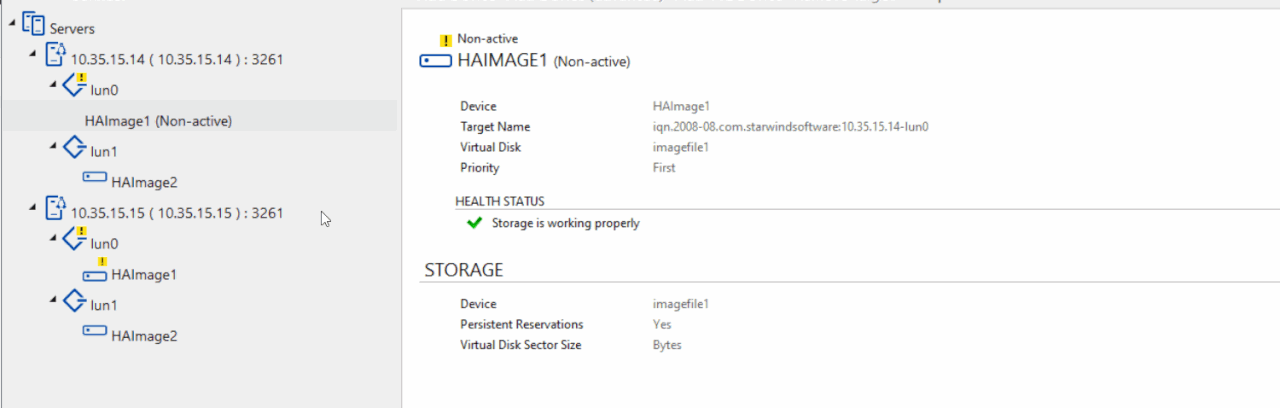
I removed the lun0 folder from the headers directory, but I still see lun0 when looking at the web gui, should that disappear on the web gui or is there something else I need to delete?

below is the ls for the headers directory only lun1 is there.
root@sw-cvm-01:/opt/starwind/starwind-virtual-san/drive_c/starwind/headers# ls -lrth
total 4.0K
drwxr-xr-x 2 root root 4.0K Sep 28 22:45 lun1
root@sw-cvm-01:/opt/starwind/starwind-virtual-san/drive_c/starwind/headers#

Image
yaroslav (staff)
Staff
Posts: 4309
Joined: Mon Nov 18, 2019 11:11 am

Tue Sep 30, 2025 3:54 pm

If you missed the script, the only way to get rid of the target is:
1. Stop the service on the affected node
2. Go to /opt/starwind/starwind-virtual-san/drive_c/starwind/
3. sudo systemctl stop starwind-virtual-san
4. sudo cp StarWind.cfg StarWind-bak.cfg.
5. sudo StarWind.cfg
6. find the entries about lun0 target and the device associated with it.
7. remove those.
8. save and exit
9. systemctl start starwind-virtual-san

Now, you should be able to start replication.
ehinkle29
Posts: 23
Joined: Thu Mar 13, 2014 8:34 pm

Tue Sep 30, 2025 6:25 pm

Okay, I have now removed lun0 from the node 1 and guess at this point I need to run the add haparnter.ps1. In that script it has addr and addr2, what do i us for the addr, is addr node1 IP and addr2 node 2 ip, with me running this against node 2 (the current good node)?

param($addr="192.168.0.1", $port=3261, $user="root", $password="starwind", $deviceName="HAImage1",
$addr2="192.168.0.2", $port2=$port, $user2=$user, $password2=$password,
#secondary node
$imagePath2="/mnt/sdb1/onetbnvme",
$imageName2="lun0",
$createImage2=$true,
$targetAlias2="lun0",
ehinkle29
Posts: 23
Joined: Thu Mar 13, 2014 8:34 pm

Tue Sep 30, 2025 8:45 pm

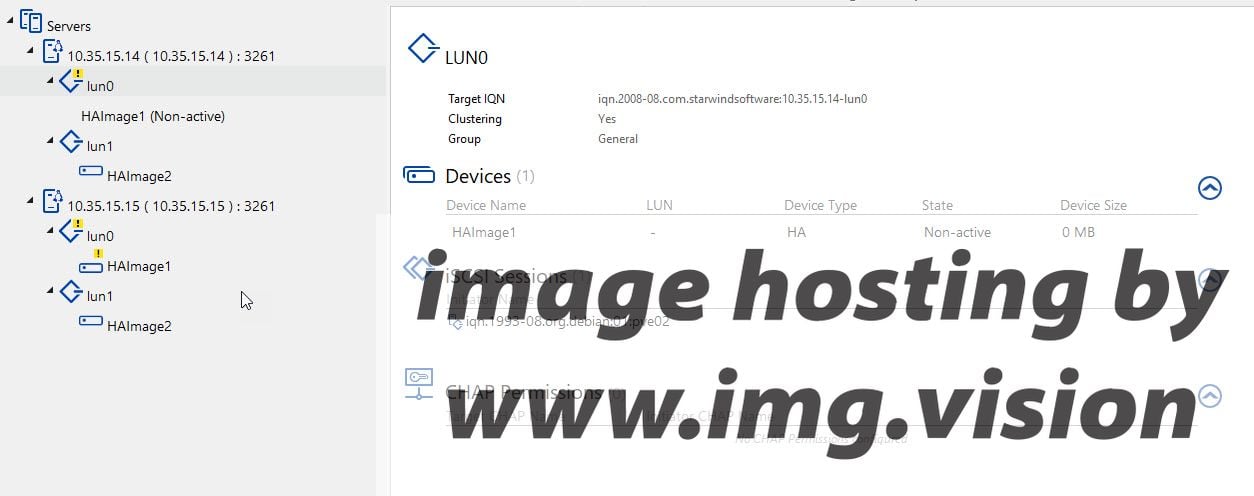
I tried using the following but got this error, the addr (.15) is the good node.

Powershell script

Code: Select all

param($addr="10.35.15.15", $port=3261, $user="root", $password="starwind", $deviceName="HAImage1",
	$addr2="10.35.15.14", $port2=$port, $user2=$user, $password2=$password,
#secondary node
	$imagePath2="/mnt/sdb1/twotbnvme",
	$imageName2="lun0",
	$createImage2=$true,
	$targetAlias2="lun0",
	$autoSynch2=$true,
	$poolName2="sdb1",
	$syncSessionCount2=1,
	$aluaOptimized2=$true,
	$syncInterface2="#p1={0}:3260" -f $addr,
    $hbInterface2="",
	$bmpType=1,
	$bmpStrategy=0,
	$bmpFolderPath="",
    $selfSyncInterface="#p1={0}:3260" -f $addr2,
    $selfHbInterface=""
	)

PS C:\Program Files\StarWind Software\StarWind\StarWindX\Samples\powershell> C:\Program Files\StarWind Software\StarWind\StarWindX\Samples\powershell\AddHaPartner_cust.ps1
Request to  10.35.51.15 ( 10.35.15.15 ) : 3261
-
control 0x000000000118DA00 -AddPartner:"" -PartnerTargetName:"#p1=iqn.2008-08.com.starwindsoftware:10.35.15.14-lun0" -Priority:"#p1=2" -nodeType:"#p1=1" -PartnerIP:"#p1=10.35.
15.14:sync:3260:1" -AuthChapType:"#p1=none" -AuthChapLogin:"#p1=0b" -AuthChapPassword:"#p1=0b" -AuthMChapName:"#p1=0b" -AuthMChapSecret:"#p1=0b" -Replicator:"#p1=0" -typeBitma
pStore:"#p1=1"
-
200 Failed: invalid partner info.. 

PS C:\Program Files\StarWind Software\StarWind\StarWindX\Samples\powershell>
I switched the addr and addr2 and got the following error.

Code: Select all

PS C:\Program Files\StarWind Software\StarWind\StarWindX\Samples\powershell> C:\Program Files\StarWind Software\StarWind\StarWindX\Samples\powershell\AddHaPartner_cust.ps1
Device not found
yaroslav (staff)
Staff
Posts: 4309
Joined: Mon Nov 18, 2019 11:11 am

Wed Oct 01, 2025 9:20 am

The syntax is similar to viewtopic.php?f=5&t=6852&p=37208&hilit=HINT8#p37208.
Try adjusting the script accordingly.
ehinkle29
Posts: 23
Joined: Thu Mar 13, 2014 8:34 pm

Wed Oct 01, 2025 12:12 pm

that link is for the createha2 ps1 script I thought I was to use the addHaPartner
yaroslav (staff)
Staff
Posts: 4309
Joined: Mon Nov 18, 2019 11:11 am

Wed Oct 01, 2025 12:19 pm

Yes, the syntax is the same. You can rework the add replication partner script using the syntax from CreateHA.
ehinkle29
Posts: 23
Joined: Thu Mar 13, 2014 8:34 pm

Thu Oct 02, 2025 1:44 pm

Yea, not clear on how that suppose to be fixed, and can't get it running. Will just backup the vms from that one that is working and look at another solution.
Post Reply