VSAN Free, 3 nodes, one node is synchronized

Software-based VM-centric and flash-friendly VM storage + free version
Post Reply
prismsoftware
Posts: 9
Joined: Thu Apr 11, 2024 5:09 pm

Sat Sep 13, 2025 10:34 am

Hi- I have a 3 node system and one node is working and synchronized. I had a multiple switch failure and the other 2 nodes are not synchronized but won't sync. Trying to run the script syncDeviceAdvanced.ps1 from either of the 2 unsynchronized nodes reports that "200 Failed: connection with one of partner node is invalid. Partner node has higher priority or partner node has synchronized/synchronizing state.. "

However, all 3 storage_HA_swdsk files look correct to me (see attached). Node 3 is the one that's synchronized, Below are the node priorities from each swdsk file on each of the nodes:

Node 3: priority 0, Node 1 priority 2, Node 2 priority 1
Node 2: priority 1, Node 1 priority 2, Node 3 priority 0
Node 1: priority 2, Node 2 priority 1, Node 3 priority 0

I also tried modifying the script to use node 3 as the synchronization partner, the line "$partnerTargetName = $dev.Partners.Item(0).TargetName" which always picks the first target I changed the 0 to a 1 to pick node 3 but that gives the same error.

Thank you very much - Dave
yaroslav (staff)
Staff
Posts: 4309
Joined: Mon Nov 18, 2019 11:11 am

Sun Sep 14, 2025 12:48 pm

Thanks for posting.

For a 3-way replica, priorities are not right viewtopic.php?t=5731.
Please see what the management console says about the devices' status. Are they in the middle of replication?

The error points to something on the connectivity side. Could you please see if you can ping the replication links?
Try setting MTU to 1500 (1514 for Windows) on the entire replication stack.
As a side note, please make sure the networking is redundant.
prismsoftware
Posts: 9
Joined: Thu Apr 11, 2024 5:09 pm

Mon Sep 15, 2025 1:16 am

Hi - thanks for the response - the network is fine, I checked all the links to and from all three nodes. I've read that post before and I don't understand something about it, are larger priority numbers higher priority? My node 3 that has priority 0 (which is the one that's synchronized) is that incorrect - should it be the highest number out of all the nodes (if the priorities are 0, 1 and 2 should the synchronized node be 2 or 0?)
yaroslav (staff)
Staff
Posts: 4309
Joined: Mon Nov 18, 2019 11:11 am

Mon Sep 15, 2025 7:40 am

if the priorities are 0, 1 and 2 should the synchronized node be 2 or 0?
0.
As a priority, the thread describes a rule of thumb: one node houses all devices of the same priority; one node has devices of the top priority. Your output shows the mix-up of priorities.
I am also thinking that the HA could go out of sync due to various reasons (e.g., latency), and then the error reads as "there is a synchronized device; can't mark as synchronized or resume synchronization". The output says that you are about to mark the device as synchronized, while there is a synchronized instance. Please don't do that, as that will corrupt the data.
Try restarting the service on the affected nodes UNLESS they have the only synchronized device of the HA mirror.

Please see what the management console shows about the devices. You can install it here (make sure to select StarWind Management Console from the dropdown) https://www.starwindsoftware.com/tmplin ... ind-v8.exe.
Having more info about the system will be nice (e.g., hypervisor, StarWind VSAN implementation (CVM/Windows-based service), connectivity diagram, etc).

I think this system could benefit from a configuration review. Please log a call with us https://www.starwindsoftware.com/support-form if you are interested in the quote.
prismsoftware
Posts: 9
Joined: Thu Apr 11, 2024 5:09 pm

Mon Sep 15, 2025 4:16 pm

Hi Yaroslav - I'm sorry I still don't understand the how the priorities are mixed up if 0 is the "highest". The only node that is synchronized (node 3) is set to priority 0 as you stated is correct. The other two nodes are set to priority 2 (node 2) and priority 1 (node 1). Both Node 1 and 2 are marked not synchronized. Each swdsk file on each node describes that nodes priority and the other 2 nodes priorities. If node 3 is 0 and Node 2 is 2 and Node 1 is 1 where is the problem? What should each node's swdsk file contain?

The nodes are all windows server 2016 using Hyper-V, the setup is identical to
https://www.starwindsoftware.com/resour ... e-vsphere/
but there are switches instead of direct connections. I just verified with powershell that I can connect via port 3260 to every interface from every node to the other 2 nodes. I also restarted node 1 and 2 and nothing changed.

I also tried running "restoreHAPartnerNode" from node 2 targetting node 3 and that also returns "connection with partner node is invalid"
yaroslav (staff)
Staff
Posts: 4309
Joined: Mon Nov 18, 2019 11:11 am

Mon Sep 15, 2025 5:40 pm

Thanks for your update.
I had a closer look at the distribution. Sorry for misleading. The formatting is misleading.
Please correct me if I read it wrong: Node 3 houses devices with 0 priority, Node 2 has devices with 1, while Node 1 has devices with 2.
Please try pinging the IPs inside the VM from each host. It looks like the VMs can't ping each other via replication links.

Could you please let me know if using StarWind VSAN as a Windows-based application is an option for this system?
prismsoftware
Posts: 9
Joined: Thu Apr 11, 2024 5:09 pm

Mon Sep 15, 2025 6:50 pm

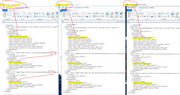
Hi Yaroslav - this is a windows system. I can ping all the nodes from every other node using the 3 links specified for each storage section in the swdsk files on each node. Here is a screenshot of the swdsk files from each node, overlapping so you can see them side by side showing the priorities in each section.

Image
yaroslav (staff)
Staff
Posts: 4309
Joined: Mon Nov 18, 2019 11:11 am

Tue Sep 16, 2025 6:25 am

Ping the VM IPs, please.
prismsoftware
Posts: 9
Joined: Thu Apr 11, 2024 5:09 pm

Tue Sep 16, 2025 2:12 pm

yes I can ping all the vms, they are all residing on node 3 since that's the only one that's synchronized.

Did you see my screenshot? Does that look correct?
yaroslav (staff)
Staff
Posts: 4309
Joined: Mon Nov 18, 2019 11:11 am

Tue Sep 16, 2025 3:24 pm

I'm sorry for misunderstanding. I was referring to StarWind VSAN VMs. Please ping their replication IPs. I think there's a MAC address mixup; i.e., a wrong MAC address is assigned to the replication IP inside CVM.
Did you see my screenshot? Does that look correct?
Yes, looks right to me. Thanks for sharing.
prismsoftware
Posts: 9
Joined: Thu Apr 11, 2024 5:09 pm

Mon Sep 22, 2025 4:49 pm

As an update to where I am with this, it's not a MAC address mixup - spent a few hours mapping out all the addresses and everything is good. I ended up using removeHAPartner on node2 (node 3 is synched, node 1 and 2 are not) and tried to just get node 1 to sync from node 3 by using restoreHAPartnerNode running from node 3 pointed at node 1. This seemed to work - node 1 ended up synching (and node 1 now has 2 stable connections to itself and node 3) but from looking at logs node 3 still seems to be looking for node 2 even though its entries are not in any of swdsk files on Node 3/Node 1. In addition Node 3's ISCSI connection to Node 1 says "reconnecting" even though all the interfaces are working (pingable and isci ports are open and tested)

I'm debating about upgrading the SAN software (mine is StarWind Virtual SAN v8.0.0 (Build 15260, [SwSAN], Win64)) - are there gotchas doing that?

I'm at the point where I feel I have to scrap the cluster storage and recreate it which I really don't want to do.
yaroslav (staff)
Staff
Posts: 4309
Joined: Mon Nov 18, 2019 11:11 am

Tue Sep 23, 2025 5:55 am

Hi,

It will stay reconnecting until replication is running. Once it is over, hit refresh in iSCSI Initiator.
prismsoftware
Posts: 9
Joined: Thu Apr 11, 2024 5:09 pm

Mon Sep 29, 2025 3:41 pm

Just an update - I managed to solve this problem.
1) updated each node to the latest build (btw the latest build moves *.swdsk files into Starwind\headers\storage and modifies the starwind.cfg file)
2) shut down the starwind service on all nodes after turning off all my VMs (and backing up religiously)
2) Did a file diff of old copies of swdsk and new swdsk files and modified them so the node priorities were correct (so node3 was priority 0 "the highest priority") as per my screenshot earlier.
3) Made sure the target/device/ACL entries in the starwind.cfg files were correct on all nodes (target/device entries are the same in my case so only the ACL entries were different on each node)
4) Started Node 3 (the synchronized one) then Node 1 and ran the syncHaDeviceAdvanced.ps1 script from Node 1 and waited until it synched

5) Started Node 2 - the sync script returned the error "connection with one of partner node is invalid. Partner node has higher priority or partner node has synchronized/synchronizing state" when trying to sync with Node3 and when synching with Node 1 "200 Failed: connection with the synchronizer or partner node is invalid..", I stopped the Starwind service and restarted the iscsi service (Restart-Service MSiSCSI in powershell) I then was able to start synching from Node 3. I think there were stale iSCSI connections that had to be dropped.

6) After the successful synch of Node 2 the connection in the iSCSI Initiator Properties "Targets" tab still showed "Inactive" for Node 2 connecting to itself and the same on the other 2 nodes (only their connections to Node 2 showed Inactive) I had to reconnect to Node 2/specify MPIO and add to favourite targets on Node 2 and the other 2 nodes then all 3 nodes were connected to each other.

I spent days trying to removeHAPartner/addHAPartner etc. to try and piece the 3 node cluster back together but the only solution that worked was to just put all the config files/swdsk files back in their original state with the priority set properly. It appears you can get into states where a node claims to be synched but still can't be communicated with. ChatGPT helped a bit analyzing the logs just after starting the VSAN service (before they get to 100MB!)

It's critital that the Starwind.cfg file and the *_HA.swdsk, *.swdsk files FROM EACH NODE all be backed up (I put all three copies from each of the 3 nodes on every node just in case one or more nodes get destroyed)
yaroslav (staff)
Staff
Posts: 4309
Joined: Mon Nov 18, 2019 11:11 am

Mon Sep 29, 2025 3:53 pm

Thanks for sharing your experience.
*.swdsk alone are useless without the *.img that houses all the data. I think you've seen that already https://www.starwindsoftware.com/best-p ... practices/.
Thanks again for putting your experience and summary on the page.
Post Reply