Changing Synchronization Channel IP Addresses

Software-based VM-centric and flash-friendly VM storage + free version
kylemcisaac
Posts: 19
Joined: Tue Dec 09, 2025 2:29 pm

Tue Feb 17, 2026 6:07 pm

yaroslav (staff) wrote:
Tue Feb 17, 2026 5:40 pm
Check another node and see if synchronized and if storage can be connected in iSCSI initiator. Make sure the appropriate changes are made to configs.
We only have two nodes, unfortunately.

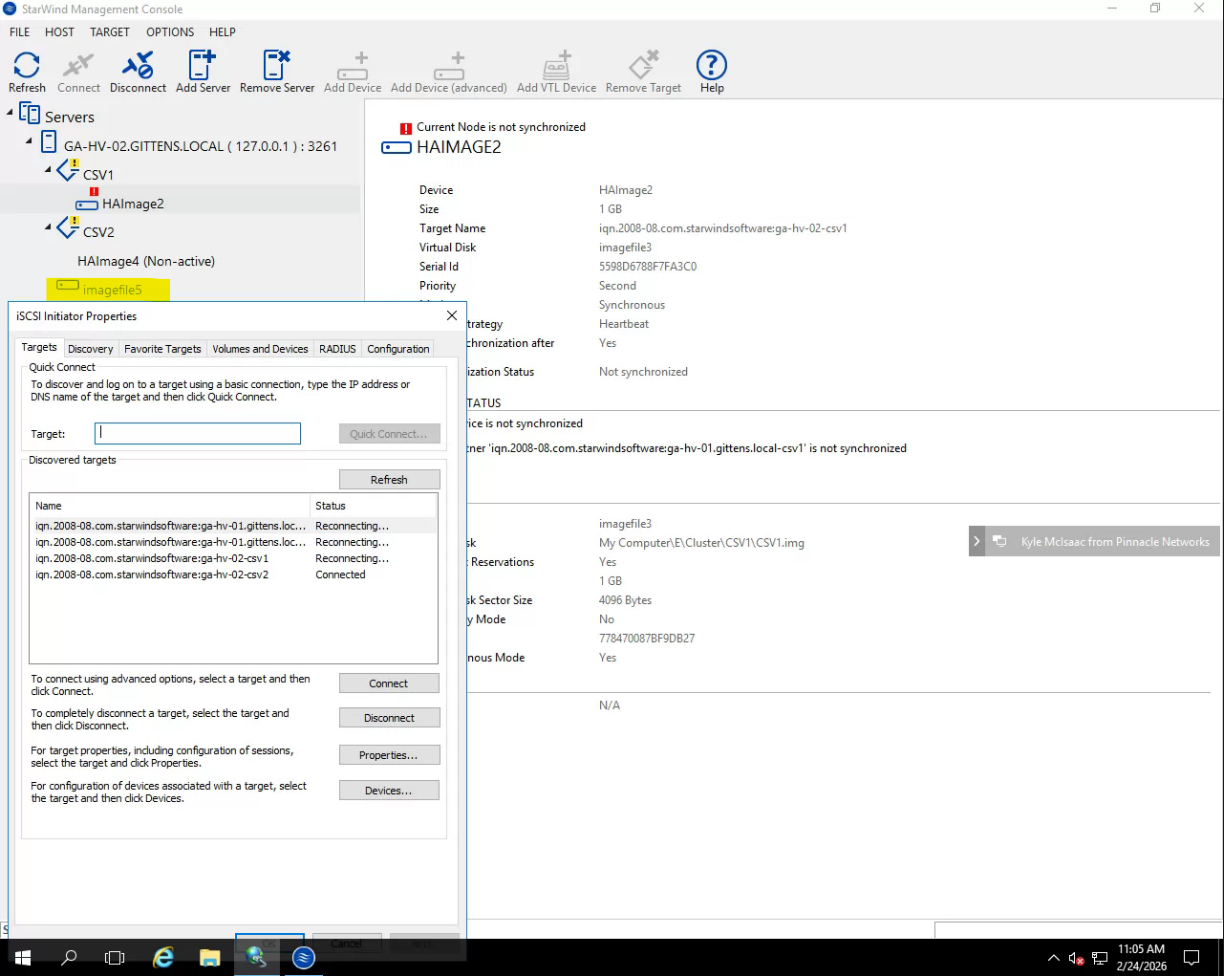
From Node 2; it has inactive on Node 1 CSV1, Node 1 CSV2, and Node 2 CSV1.
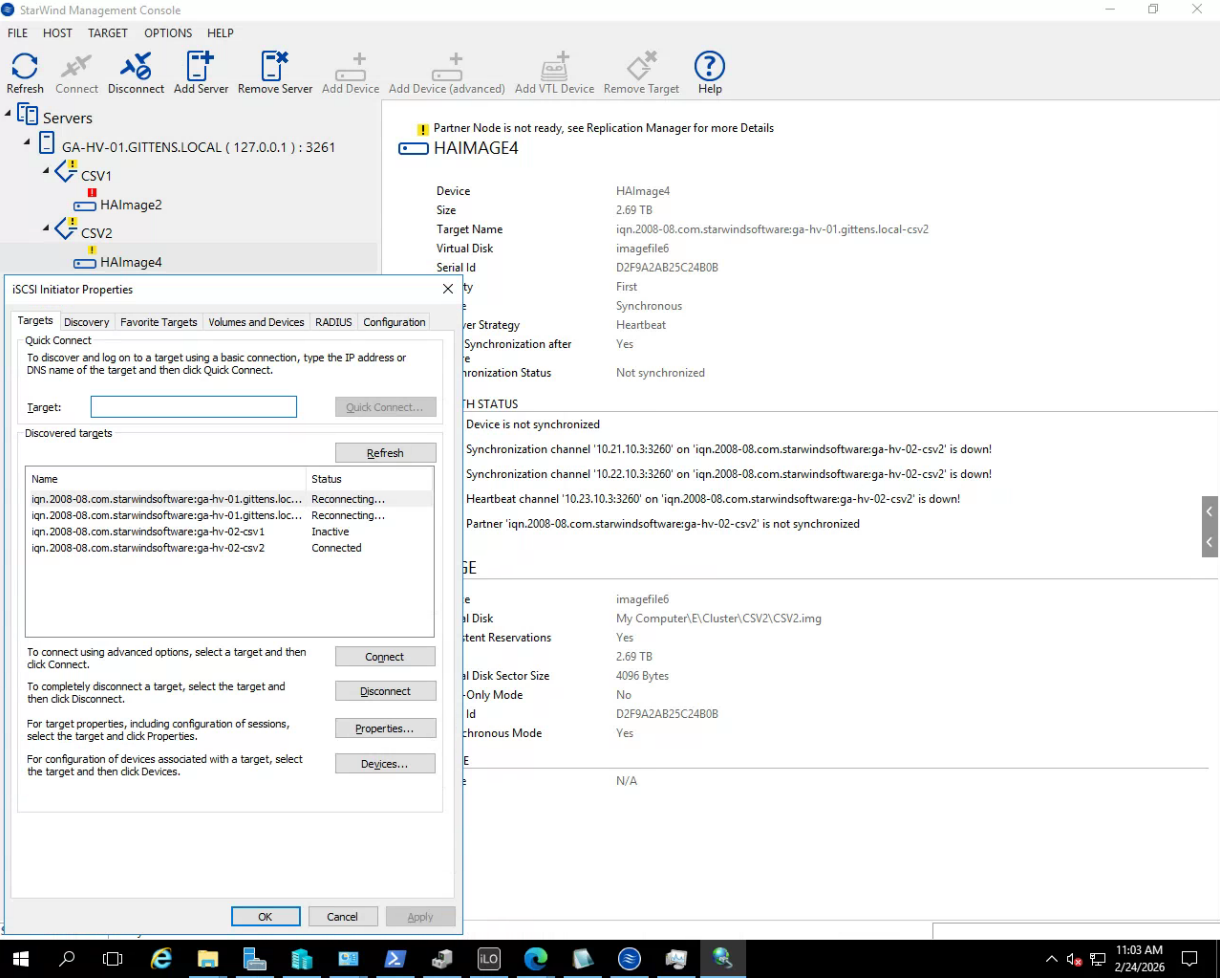
From Node 1; it has Reconnecting on Node 1 CSV1, Inactive on Node 1 CSV2 and Node 2 CSV1, and Connected to Node 2 CSV2.
yaroslav (staff)
Staff
Posts: 4309
Joined: Mon Nov 18, 2019 11:11 am

Tue Feb 17, 2026 6:45 pm

Hi,
Thanks.
Check which HA is saying synchronized. Connect it over iSCSI in iSCSi initiator.
kylemcisaac
Posts: 19
Joined: Tue Dec 09, 2025 2:29 pm

Tue Feb 24, 2026 2:59 pm

Working on this still, but still can't quite figure out what's happening. We have a new 10GbE Dual NIC coming and brought back the IPs the way they were originally (10.21.10.2/10.21.10.3 and 10.22.10.2/10.22.10.3 for data, and 10.23.10.2/10.23.10.3 for control respectively per machine).

iSCSI Initiator and Management Console from Node 1 shows the following:
Image

iSCSI Initiator and Management Console from Node 2 shows the following:
Image

We also have a rogue imagefile5 that doesn't want to go away on Node 2.
yaroslav (staff)
Staff
Posts: 4309
Joined: Mon Nov 18, 2019 11:11 am

Tue Feb 24, 2026 3:49 pm

Cool, just review the StarWind Interfaces in the config files and update them accordingly. Update iSCSI Initiator too (and purge the favorite targets).
To bring CSV1 online, stop StarWindService on one node > mark the CSV as synchronized on the remaining node, and check the data. If all is good, start the node and start replication manually.
See if there is volume on the underlying storage of that node. If all is good with the networks, the easiest will be removing that volume from the configs. Stop the service > go to StarWind.cfg > Remove any entry for that volume (target and files) > Remove entries in /headers and underlying storage > run the remove partner script against the "healthy" node. That should remove the devices. Add the replication partner afterward. Afterward, make sure that the priorities logic will persist viewtopic.php?t=5731.
It looks like CSV1 does not want to replicate. Check networking and make sure the files are there, please.

P.s. I'd really suggest reviewing the system with the tech, as it will get a support plan. It will be much faster to handle this situation during the call.

kylemcisaac
Posts: 19
Joined: Tue Dec 09, 2025 2:29 pm

Tue Feb 24, 2026 6:38 pm

yaroslav (staff) wrote:
Tue Feb 24, 2026 3:49 pm
Cool, just review the StarWind Interfaces in the config files and update them accordingly. Update iSCSI Initiator too (and purge the favorite targets).
To bring CSV1 online, stop StarWindService on one node > mark the CSV as synchronized on the remaining node, and check the data. If all is good, start the node and start replication manually.
See if there is volume on the underlying storage of that node. If all is good with the networks, the easiest will be removing that volume from the configs. Stop the service > go to StarWind.cfg > Remove any entry for that volume (target and files) > Remove entries in /headers and underlying storage > run the remove partner script against the "healthy" node. That should remove the devices. Add the replication partner afterward. Afterward, make sure that the priorities logic will persist viewtopic.php?t=5731.
It looks like CSV1 does not want to replicate. Check networking and make sure the files are there, please.

P.s. I'd really suggest reviewing the system with the tech, as it will get a support plan. It will be much faster to handle this situation during the call.
So we were almost back to normal, and had another catastrophic hardware failure. Is there a way for us to be able to get just node 1 up and running solo?
yaroslav (staff)
Staff
Posts: 4309
Joined: Mon Nov 18, 2019 11:11 am

Tue Feb 24, 2026 6:59 pm

Yup.
Start that node up > mark the devices as synchronized manually. You can force synchronization, try using manual synchronization. Use SyncHaDevice.ps1, comment $device.Synchronize([SwHaSyncType]::SW_HA_SYNC_FULL, "") and uncomment #$device.MarkAsSynchronized()
Start the VMs and see if data inside is up-to-date.
If you are happy with what you see, resume another node. Otherwise, repeat stop the service on the only active node and mark its counterpart.
Sync starts after you resume all replication partners.

Alternatively, you can edit the config files' <synchronization status>. Stop starwindservice > locate files> set it to 1 for the top entry in the *_HA.swdsk. It is the "last resort" as the script normally does it.

I hope that you'll get to the bottom of it...
kylemcisaac
Posts: 19
Joined: Tue Dec 09, 2025 2:29 pm

Wed Feb 25, 2026 2:47 pm

yaroslav (staff) wrote:
Tue Feb 24, 2026 6:59 pm
Yup.
Start that node up > mark the devices as synchronized manually. You can force synchronization, try using manual synchronization. Use SyncHaDevice.ps1, comment $device.Synchronize([SwHaSyncType]::SW_HA_SYNC_FULL, "") and uncomment #$device.MarkAsSynchronized()
Start the VMs and see if data inside is up-to-date.
If you are happy with what you see, resume another node. Otherwise, repeat stop the service on the only active node and mark its counterpart.
Sync starts after you resume all replication partners.

Alternatively, you can edit the config files' <synchronization status>. Stop starwindservice > locate files> set it to 1 for the top entry in the *_HA.swdsk. It is the "last resort" as the script normally does it.

I hope that you'll get to the bottom of it...
Perfect, thanks! That worked and we're able to see the VMs now.

Right now, we're in data preservation, as the second node died completely. Luckily, the first node was primary and handled the bulk of processing, so we are copying the virtual machine data to external media for safety and restoration until we can look at new hardware for them.
Post Reply