Changing Synchronization Channel IP Addresses

Software-based VM-centric and flash-friendly VM storage + free version
kylemcisaac
Posts: 19
Joined: Tue Dec 09, 2025 2:29 pm

Mon Feb 16, 2026 3:58 pm

Good day,

We recently had a hardware failure on one of our two nodes in which the 10GbE Fibre Adapter has failed. We cannot seem to find the way to change the IP address mapped to the two synchronization channels. How can we adjust these to a different adapter/IP range on VSAN?

Thank you,
Kyle McIsaac
yaroslav (staff)
Staff
Posts: 4309
Joined: Mon Nov 18, 2019 11:11 am

Mon Feb 16, 2026 4:38 pm

You need to edit the .swdsk files (requires stopping the service).
In Windows, if the Data interface (i.e., one you use for iSCSI) is affected, please remove old partner favorites and reconfigure iSCSI Initiator for each node.
kylemcisaac
Posts: 19
Joined: Tue Dec 09, 2025 2:29 pm

Mon Feb 16, 2026 5:33 pm

Hi there,

Got the changes made, and I'm no longer seeing the error about the IPs missing. It is currently stating that the partners are not synchronized; how long should it be before syncing kicks in? We did go from a 10GbE connection to a 1GbE; so I can assume it'll be considerably slower.

Thanks,
Kyle
kylemcisaac
Posts: 19
Joined: Tue Dec 09, 2025 2:29 pm

Mon Feb 16, 2026 7:13 pm

yaroslav (staff) wrote:
Mon Feb 16, 2026 4:38 pm
You need to edit the .swdsk files (requires stopping the service).
In Windows, if the Data interface (i.e., one you use for iSCSI) is affected, please remove old partner favorites and reconfigure iSCSI Initiator for each node.
Been waiting approximately an hour and seeing no changes on the status. Any ideas of what I can try?

Seeing this in the server logs:

Code: Select all

2/16 15:40:20.270 41f4 C[872], IN_LOGIN: iScsiConnection::fsmT7: T7.
2/16 15:40:20.270 35a0 Sw: *** Swn_SocketRecv: WSARecv() failed with error 10054 (0x2746)!
2/16 15:40:20.270 41e8 HA: CHADevice::register_session: Client initiator iqn.1991-05.com.microsoft:ga-hv-01.domain.local is trying to register a session within the 'iqn.2008-08.com.starwindsoftware:ga-hv-01.domain.local-csv1' target... (sessId = 0x873, initiatorNameIsid = iqn.1991-05.com.microsoft:ga-hv-01.domain.local,400001370001)
2/16 15:40:20.270 35a0 Srv: *** SwSocket::Recv: Swn_SocketRecv() failed with error 10054 (0x2746)!
2/16 15:40:20.270 41e8 HA: CHADevice::register_session: Unable to register the new client session. The node is not active!
2/16 15:40:20.270 35a0 C[872], IN_LOGIN: iScsiConnection::receive: recvData returned 10054 (0x2746)!
2/16 15:40:20.270 41e8 HA: CHADevice::register_session: Return code 21.
2/16 15:40:20.270 41e8 Tgt: *** iScsiTarget::openSession: iqn.2008-08.com.starwindsoftware:ga-hv-01.domain.local-csv1: can't register session. The device 'HAImage2' is not ready.
2/16 15:40:20.270 41e8 T[873,1]: ***iScsiTask::startLoginPhase: *ERROR* Login request: device open failed.
2/16 15:40:20.270 a60 S[872]: iScsiSession::~iScsiSession: ~Session
2/16 15:40:20.270 3a60 C[873], IN_LOGIN: iScsiConnection::doTransition: Event - LOGIN_REJECT.
2/16 15:40:20.270 41e8 Sw: *** Swn_SocketRecv: WSARecv() failed with error 10054 (0x2746)!
2/16 15:40:20.270 3a60 C[873], IN_LOGIN: iScsiConnection::fsmT7: T7.
2/16 15:40:20.270 41e8 Srv: *** SwSocket::Recv: Swn_SocketRecv() failed with error 10054 (0x2746)!
2/16 15:40:20.270 41e8 C[873], IN_LOGIN: iScsiConnection::receive: recvData returned 10054 (0x2746)!
2/16 15:40:20.270 2218 S[873]: iScsiSession::~iScsiSession: ~Session
yaroslav (staff)
Staff
Posts: 4309
Joined: Mon Nov 18, 2019 11:11 am

Mon Feb 16, 2026 7:16 pm

Please make sure to make the change on both nodes.
DATA is the section that needs to be modified.
kylemcisaac
Posts: 19
Joined: Tue Dec 09, 2025 2:29 pm

Mon Feb 16, 2026 7:18 pm

yaroslav (staff) wrote:
Mon Feb 16, 2026 7:16 pm
Please make sure to make the change on both nodes.
On node 1, I set the IP address to the other side 10.23.10.3; and on node 2, I set the IP to 10.23.10.2.
yaroslav (staff)
Staff
Posts: 4309
Joined: Mon Nov 18, 2019 11:11 am

Mon Feb 16, 2026 7:18 pm

Share the config files please.
kylemcisaac
Posts: 19
Joined: Tue Dec 09, 2025 2:29 pm

Mon Feb 16, 2026 7:26 pm

yaroslav (staff) wrote:
Mon Feb 16, 2026 7:18 pm
Share the config files please.
Here are the swdsk files. I appended which system is which on the file name.
Node 1 (GA-HV-01) is 10.23.10.2 and Node 2 (GA-HV-02) is 10.23.10.3
Attachments
Files.zip
(4 KiB) Downloaded 138 times
yaroslav (staff)
Staff
Posts: 4309
Joined: Mon Nov 18, 2019 11:11 am

Mon Feb 16, 2026 7:31 pm

Thanks. The config should have different IPs. Please make sure to use different IPs.
kylemcisaac
Posts: 19
Joined: Tue Dec 09, 2025 2:29 pm

Mon Feb 16, 2026 7:40 pm

yaroslav (staff) wrote:
Mon Feb 16, 2026 7:31 pm
Thanks. The config should have different IPs. Please make sure to use different IPs.
Different IPs per data, control, and data?

Code: Select all

              <link id="2" type="data" priority="1" connections="1">
                <peer ip="10.23.10.3" port="3260"/>
              </link>
              <link id="3" type="control" priority="1" connections="1">
                <peer ip="10.23.10.3" port="3260"/>
              </link>
              <link id="1" type="data" priority="1" connections="1">
                <peer ip="10.23.10.3" port="3260"/>
              </link>
yaroslav (staff)
Staff
Posts: 4309
Joined: Mon Nov 18, 2019 11:11 am

Mon Feb 16, 2026 7:42 pm

There must be no IP address conflicts. Please reconfigure both nodes.
Please also remove the cache.
kylemcisaac
Posts: 19
Joined: Tue Dec 09, 2025 2:29 pm

Tue Feb 17, 2026 3:05 am

yaroslav (staff) wrote:
Mon Feb 16, 2026 7:42 pm
There must be no IP address conflicts. Please reconfigure both nodes.
Please also remove the cache.
On server #1 I changed the IPs to data: 192.168.1.34; control: 10.23.10.3; and data: 192.168.1.11 (the IPs matching server #2)
On server #2 I changed the IPs to data: 192.168.1.33; control: 10.23.10.2; and data: 192.168.1.10 (the IPs matching server #1)

Still not getting any replication.

Assuming node 1 and node 2 are identical images between the two, is there a way to make server #1 come back as primary so we can get mostly back online?
kylemcisaac
Posts: 19
Joined: Tue Dec 09, 2025 2:29 pm

Tue Feb 17, 2026 5:21 pm

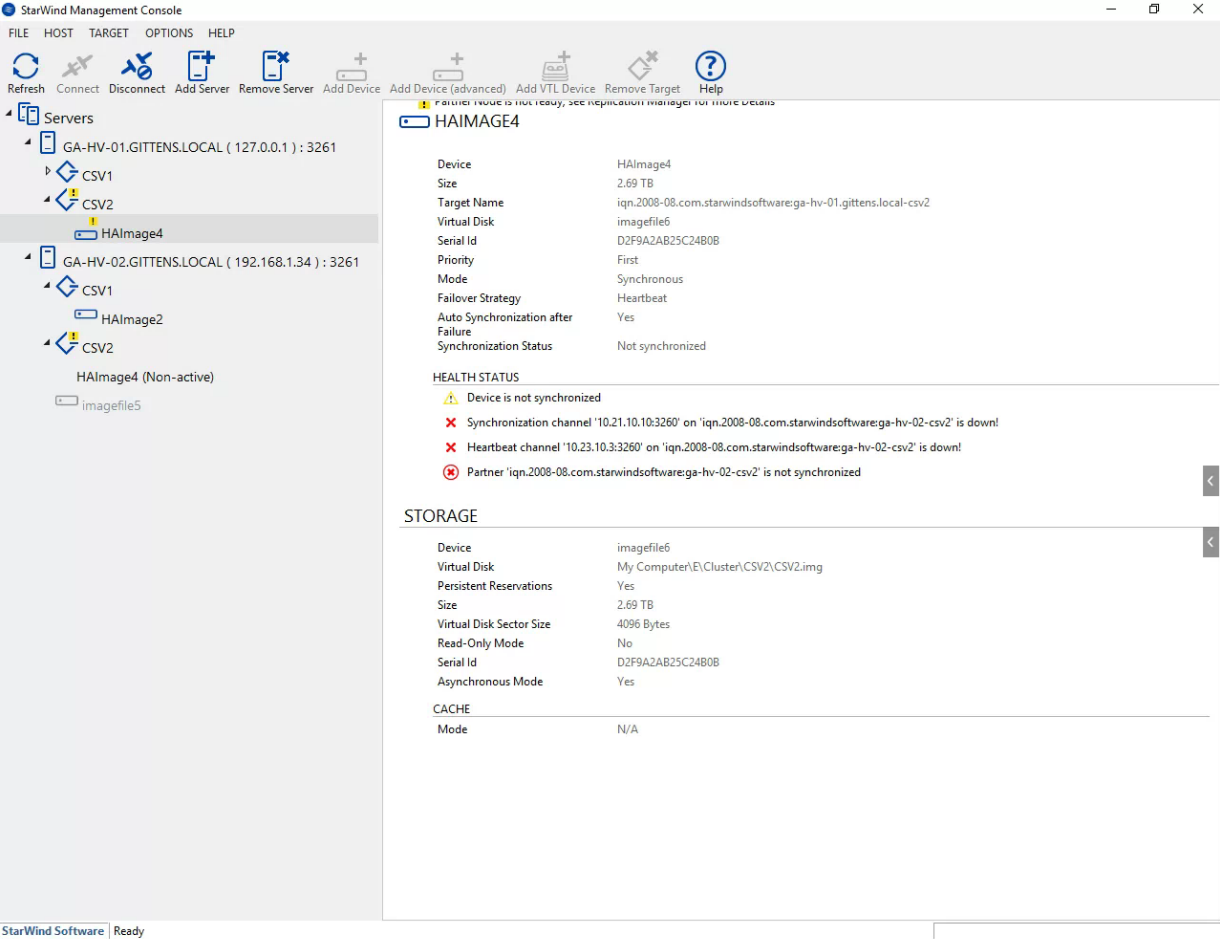
I've removed the caches per the first link. The first CSV is showing synced now; however, the second one is showing the following:

Node 1
Device: HAImage4
Size: 2.69TB
Virtual Disk: imagefile6
Priority: First
Mode: Synchronous
Failover Strategy: Heartbeat
Auto Synchronization after Failure: Yes
Synchronization Status: Not synchronized

Health Status:
Device is not synchronized
Synchronization channel '10.21.10.10:3260' no 'iqn.2008-08...' is down!
Heartbeat channel '10.23.10.3:3260' no 'iqn.2008-08...' is down!
Partner 'iqn.2008-08...' is not synchronized.

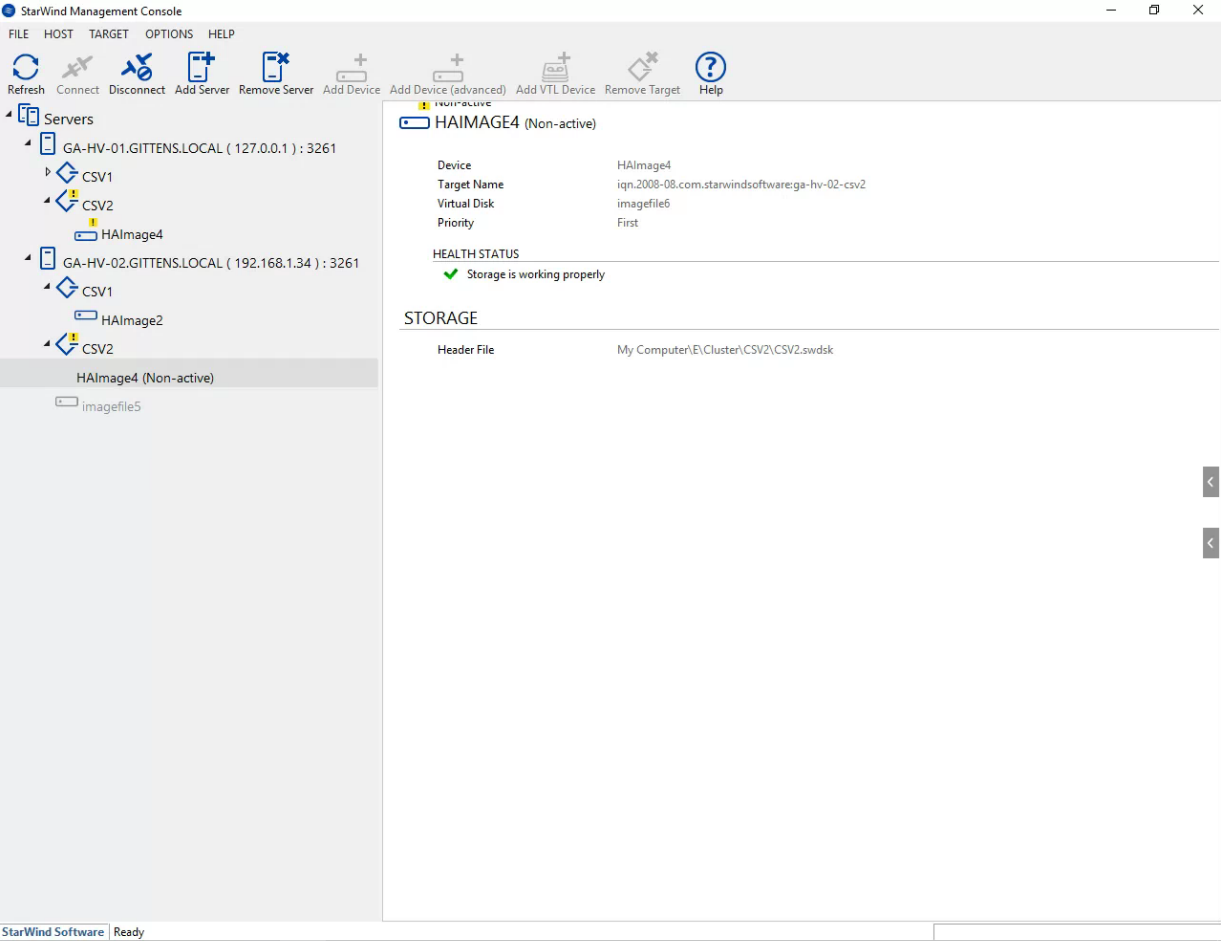
Node 2
Device: HAImage4
Virtual Disk: imagefile6
Priority: First

Health Status:
Storage is working properly

Image
Image
yaroslav (staff)
Staff
Posts: 4309
Joined: Mon Nov 18, 2019 11:11 am

Tue Feb 17, 2026 5:40 pm

Check another node and see if synchronized and if storage can be connected in iSCSI initiator. Make sure the appropriate changes are made to configs.
Post Reply