

P2V failure

VM image converter (VMDK, VHD, VHDX, IMG, RAW, QCOW and QCOW2), P2V migrator
Post Reply
ProfessionalTart
Posts: 2
Joined: Sun Sep 20, 2026 7:25 am

Sun Sep 20, 2026 8:16 am

V2V converter version 9.0.1.878
Windows 11 pro 25h2


I am trying to use Starwind V2V to image a Win11 pro system (I will be rebuilding the system it with another OS, and want the disk image as a reference/to run as a VM to migrate any data found missing).

With V2V installed on the Windows system, I select P2V, and then run into problems with the subsequent choices:

Disk Volume:
- Not suitable, skips EFI partition

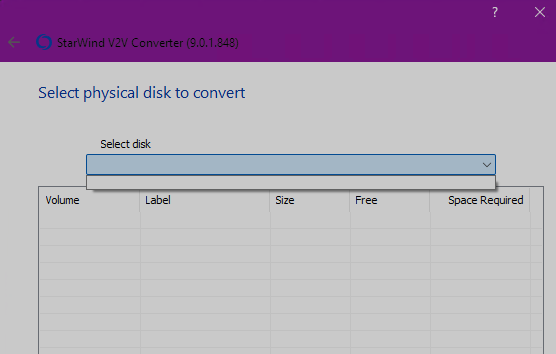
Physical Disk:
- there are no disks to select
- see attached screenshot - hopefully the URL stays active:
Image

Entire Machine:
- seems promising, I can deselect all but the specific physical disks/volumes I want to image
- the next step won't let me select the target/destination image to be Local file, it's greyed out
- I don't have access to any other running hypervisors that are not the Windows system I am trying to image
- I assume it wants access to a hypervisor to try and recreate some settings for the VM itself above and beyond the disk image?


This seems to be a similar/the same issue as per viewtopic.php?t=7335 and viewtopic.php?t=6149

I have assumed that a P2V cloning the physical disk to a local file (on another disk) is probably the solution I was after - because I don't necessarily know what hypervisor I will be mounting the VHDX into. It looks like Entire Machine, and then using localhost and Windows Authentication for a Hyper-V server is enough to maybe have that option work, but I have concerns about it mounting itself on itself.
yaroslav (staff)
Staff
Posts: 4464
Joined: Mon Nov 18, 2019 11:11 am

Sun Sep 20, 2026 3:57 pm

Welcome to StarWind forum.
Dumb question: Do you run it as administrator?
If so, please stick to disk2VHD. I will file the internal bug request.
ProfessionalTart
Posts: 2
Joined: Sun Sep 20, 2026 7:25 am

Mon Sep 21, 2026 4:35 am

yaroslav (staff) wrote:
Sun Sep 20, 2026 3:57 pm
Dumb question: Do you run it as administrator?
If so, please stick to disk2VHD. I will file the internal bug request.
Not a dumb question, I'm sorry I didn't clarify that originally! Yes, I ran it as Administrator - directly, and through the UAC elevation prompt when trying to not run it as admin. Both give the same result, with no disks in the drop-down.

A note for anyone who stumbles upon this thread before a fix is put in place: I managed to work around this by selecting Entire machine instead of Physical disk, de-selecting all disks/drives not required (by the way, I appreciate that the default table layout shows disks ordered by ID number, and for each disk the partitions laid out in the same order as on the disk itself), selecting Hyper-V server, and using 'localhost' for the hostname. When I configure the job, I can then select the local disk/path I want to save it at.

Once I copied the created folders to my desktop computer, I could import the VM instead of creating a new VM and attaching the VHDX file, and also copy the VHDX file itself to my TrueNAS host to try and import/convert it to a VM/zvol there.
yaroslav (staff)
Staff
Posts: 4464
Joined: Mon Nov 18, 2019 11:11 am

Mon Sep 21, 2026 8:22 am

Hi,

Thanks for sharing the workaround!
Post Reply